
AI phone receptionist · how it works
A customer rings. The AI answers, books them in and texts a confirmation.
You keep your number. The calls you can answer, you still answer. Only the ones you can't get to go to the AI.
One call, start to finish
Three people are involved: your customer, the AI and you. This is who does what.
- 1
Customer
Calls your usual number. You don't change it.
- 2
You, the owner
You're busy and don't pick up. The call forwards by itself.
- 3
AI receptionist
Answers as your business, in Mandarin or English.
- 4
AI receptionist
Answers questions from your info sheet, checks your diary and books a free time.
- 5
Customer
Gets a text confirming the service, date and time.
- 6
You, the owner
You get a text for every new booking.
- 7
Customer
Gets a reminder at 10 am the day before.
- 8
You, the owner
You see every booking and call in the portal on your phone.
01
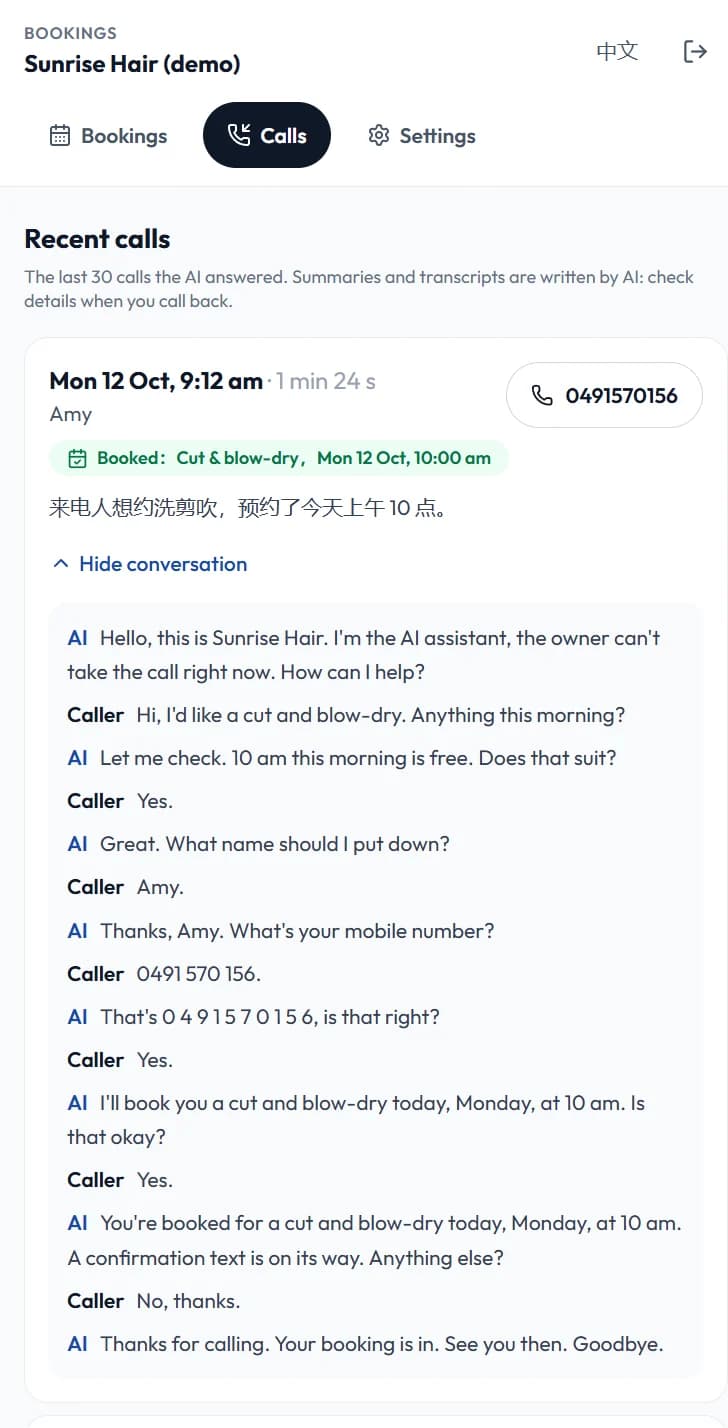
It answers like your front desk
The AI picks up as your business and talks to the caller the way a receptionist would. Afterwards you can read exactly what was said.
- Speaks Mandarin or English, following the caller
- Answers prices, hours and common questions from the info you gave it
- Reads the mobile number back digit by digit before saving it
- Every call gets a short summary and the full conversation
02
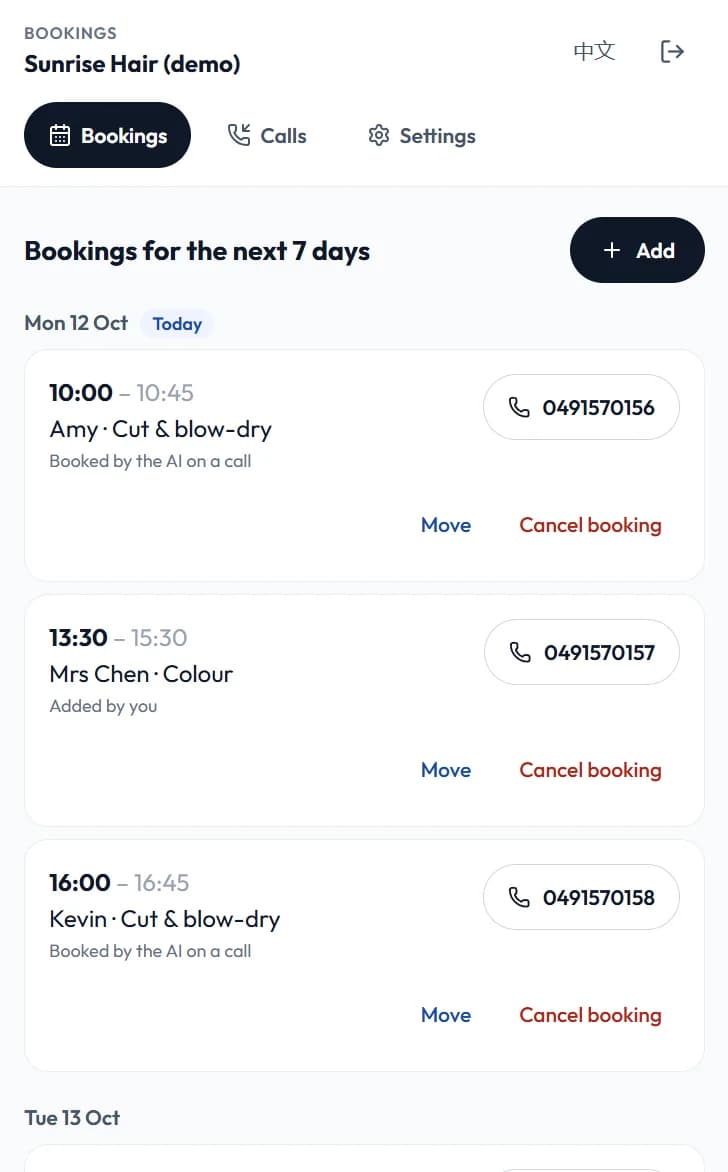
It books the time on the spot
The AI looks at your real diary while the customer is still on the line. No call-back needed to settle a time.
- Only offers the services and opening hours you set
- The same time is never given to two customers
- Repeats the service, date and time and waits for a yes before booking
- The booking appears in your portal straight away
03
Both of you get a text
Texts go out from your business's own line, so a customer can simply reply. These are the exact words.
- The customer gets a confirmation as soon as it is booked, in the language they spoke on the call
- You get a text for every new booking
- At 10 am the day before, the customer is reminded and you get tomorrow's list
- If the customer replies, the reply is passed to your mobile
The customer's phone
[Sunrise Hair] Booked: Cut & blow-dry, Mon 12 Oct, 10:00 am. To change or cancel, reply to this text or call.
The day before, 10 am
[Sunrise Hair] Reminder: Cut & blow-dry tomorrow, Mon 12 Oct, 10:00 am. To change or cancel, reply to this text or call.
Your phone
【AI新预约】Amy 0491 570 156,洗剪吹,10月12日 周一 10:00
The day before, 10 am
【明日预约】10月13日 周二 共 2 个:09:30 烫发 林小姐;14:00 洗剪吹 David。后台:fordexa.com/portal
Customers are texted in the language they spoke on the call. Your own notices are in Chinese.
04
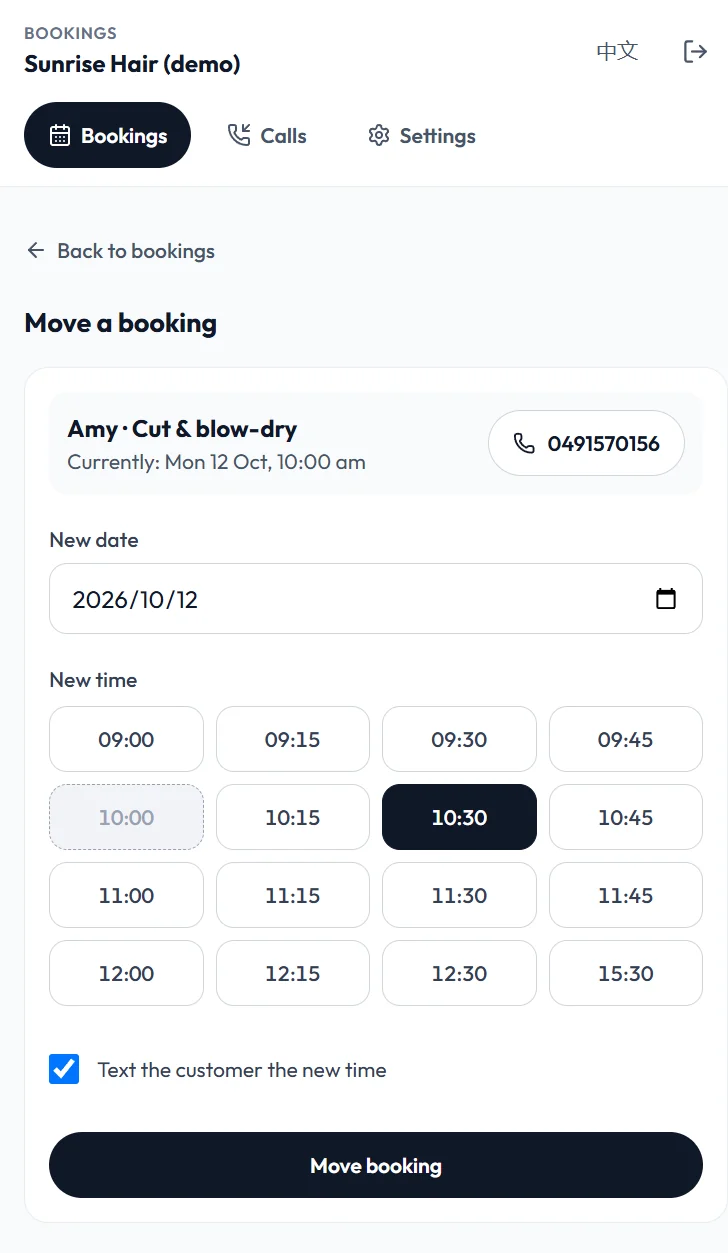
A customer wants another time? Two taps
When a customer replies asking to change, the text that reaches you names their booking and carries a link. Open it, pick the new time, done.
- The link opens that customer's booking, ready to move
- You see every free time; the one they have now is marked
- The customer is texted the new time, and the reminder follows it
- It moves in one step, so the customer is never left without a booking
1 · Your phone: the customer's reply, passed on
【客人短信】0491 570 156:可以改到10点半吗? 他的预约:洗剪吹 10月12日 周一 10:00 改时间 fordexa.com/portal/b/41
2 · The customer's phone, after you move it
[Sunrise Hair] Your booking has moved: Cut & blow-dry, Mon 12 Oct, 10:30 am. To change or cancel, reply to this text or call.
05
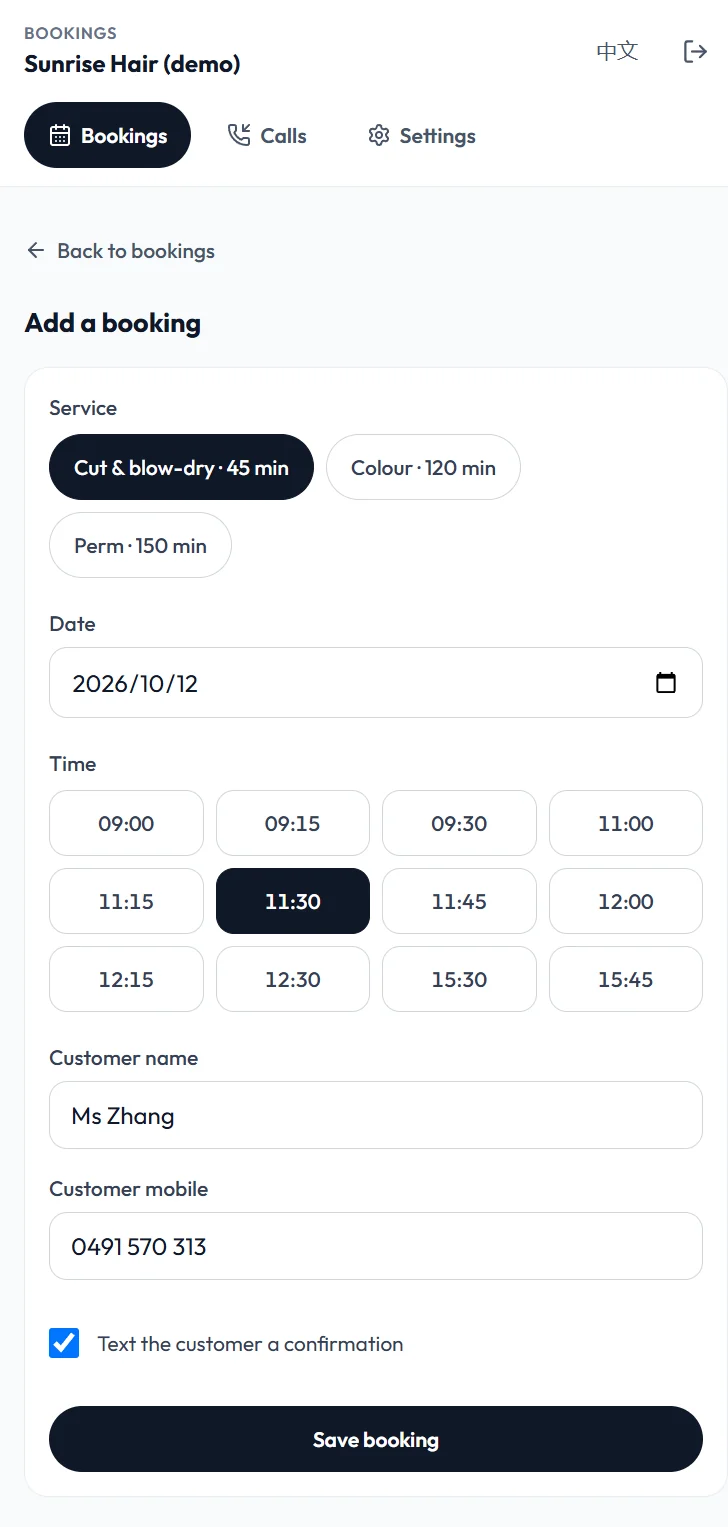
Add your own bookings in seconds
Walk-ins and WeChat bookings go in the same diary, so the AI never offers a time you have already given away.
- Pick the service, tap a free time, enter a name and mobile
- Choose whether the customer gets a confirmation text
- Move or cancel any booking in two taps
06
You decide what can be booked
Services, how long each takes and your opening hours are yours to change at any time.
- Several periods a day, for a lunch break or split shifts
- Switch a service off without deleting it
- One switch turns phone booking off: the AI goes back to taking messages
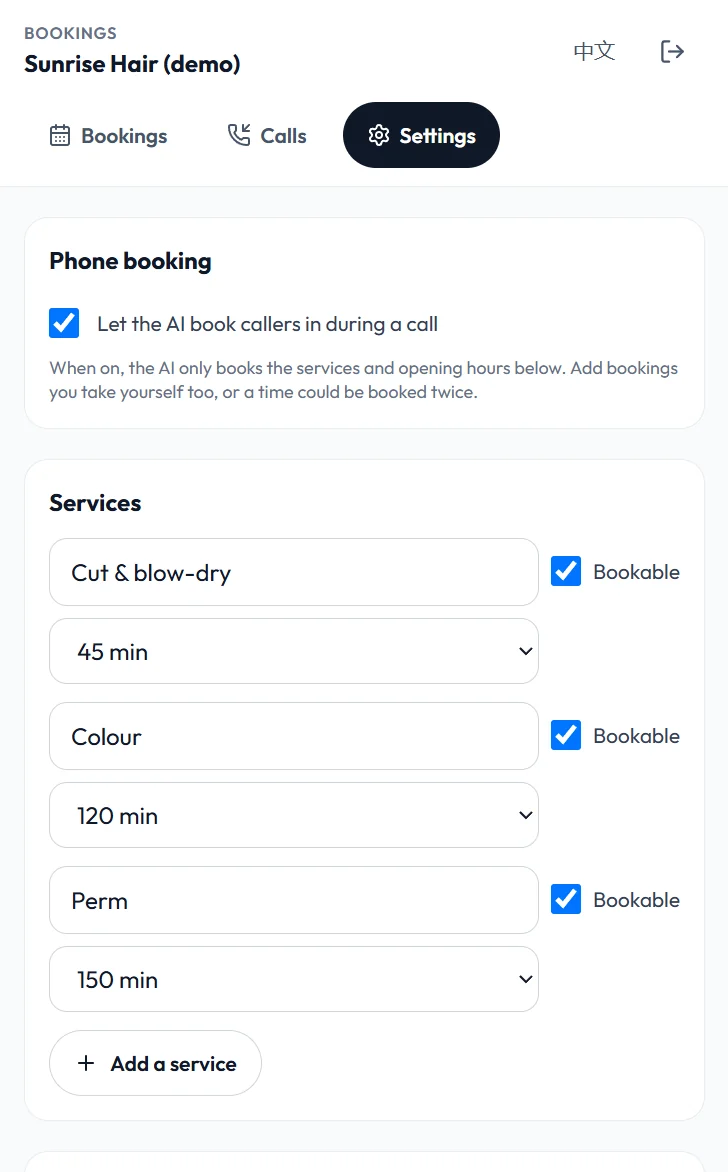
Real screen from the owner portal. The business and people shown are made up.
What you do to get started
- 1
Tell us your services, how long each takes, your opening hours and the questions callers usually ask.
- 2
Set your mobile to forward unanswered calls to the line we give you. It takes one dial code.
- 3
Sign in to the portal with your own mobile number. No password: we text you a code.
We set up the rest, including the line and the AI's knowledge of your business.
Worth knowing before you start
- It suits services done at your premises with a set length, such as hair, beauty, massage or a clinic. Call-out jobs are still taken as messages.
- One booking at a time. If two staff can serve at once, the second slot is not offered yet.
- A customer who wants to change or cancel replies to the text or calls. The reply reaches your mobile with a link to move the booking; you decide and tap. The AI does not move or cancel bookings by itself.
- The AI only quotes prices and hours you have written down. Anything else, it says you will confirm.
- Bookings you take yourself need adding to the portal, otherwise the same time could be offered again.
One price for all of it
A$199/month incl. GST
Call answering, phone booking, confirmation and reminder texts, and the owner portal. 100 answered calls a month are included, then A$0.80 per call. No setup fee, a 14-day free trial, cancel any time.
Hear it for yourself
Call 0468 048 666. It is our own line, answered by the same AI, and it will really book you a free 15-minute call with us.